Move Your Mem0 Memories to Memanto in One Command
A complete account of what `memanto migrate mem0` does to your data: the endpoints it reads, how a Mem0 category becomes a typed Memanto memory, what the dry run shows before a single write, and what changes on the other side. The case for moving is built entirely from Mem0's own documentation.

You have a Mem0 account with a few thousand memories in it, and you want to know what they would look like inside Memanto without losing a week to a migration script. That is one command: memanto migrate mem0. This post is the full account of what it does to your data, because "one command" is only reassuring if you know exactly what the command touches.
We are going to walk the whole pipeline: which Mem0 endpoints get read, how a Mem0 row becomes a typed Memanto memory, what the dry run shows you before a single write happens, what the savings report is really measuring (and what it is only modelling), and the four things that do not come across at all. If you are evaluating rather than committing, the dry run alone is worth the five minutes.
What the command actually does
Five steps, in this order. Every one of them writes its artifacts to a timestamped run directory so nothing about the migration is invisible after the fact.
| Step | What happens | Artifact |
|---|---|---|
| 1. Export | Lists every entity in your Mem0 account, then pages through the memories attached to each one | mem0_export.json |
| 2. Map | Converts each Mem0 row into a Memanto memory payload with a type, tags, confidence, provenance, and the original timestamp | mapped_preview.json |
| 3. Report | Computes volume, token, storage, and latency estimates from your real export | migrate-report.md |
| 4. Write | Bulk-writes the mapped payloads in batches of 100 through batch_remember | per-batch counters |
| 5. Summarize | Prints source count, mapped count, type breakdown, imported, failed, and the run directory path | console panel |
On a dry run, steps 4 and 5 change: nothing is written, and the summary says so in yellow. Everything else runs identically, which is the point. The preview file you inspect is byte-for-byte the payload the real run would send.
Before you start
You need Memanto installed, a target agent to migrate into, and a Mem0 API key. The key is only needed for a live export; if you already have a Mem0 export JSON on disk you can skip it entirely with --file.
bashpip install memanto
memanto                                  # pick "Cloud" (free key) or "On-Prem" (Docker, no account)

# create the agent the memories will land in, and activate it
memanto agent create support-bot --pattern support --description "Migrated from Mem0"

# confirm it is the active one
memanto config show
The --pattern flag takes project, support, or tool and defaults to tool. memanto agent create activates the agent immediately, so the migration will target it without you passing --agent.
Step one: dry run, before you decide anything
Run the dry run first. It does not need an active agent, because the target is only resolved when a write is actually going to happen. That means you can point it at your Mem0 account before you have created a single Memanto agent, purely to see what the estate would look like.
bashmemanto migrate mem0 --dry-runIf no key is stored yet, you get a prompt with hidden input, and the key is written to ~/.memanto/.env so you are not asked again. You can also pass --api-key, or set MEM0_API_KEY in the environment. All three routes end in the same place.
text╭─ Mem0 -> Memanto  Dry run ─────────────────────────────────╮
╰────────────────────────────────────────────────────────────╯
  … Listing all users, agents, apps, and runs...
  … Found 7 entities (2 agents, 4 users, 1 app) - fetching memories for each
  … Fetching memories (deduped by id)...
  … Fetching memories [1/7] user_id=alex
  …   fetched 214 (total count: 214)
  …
  … Mapping source records onto Memanto schema...
  … Rendering savings report...

╭─ Dry run complete ─────────────────────────────────────────╮
│ Source records: 1,284                                      │
│ Mapped memories: 1,279  (skipped 5 empty)                  │
│ Type breakdown: fact: 612, preference: 340, goal: 118, ... │
│                                                            │
│ Dry run — no writes performed.                             │
│                                                            │
│ Run dir: ~/.memanto/migrate/mem0/20260910_141802            │
│ Mapped preview: .../mapped_preview.json                    │
│ Savings report: .../migrate-report.md                      │
╰────────────────────────────────────────────────────────────╯
Two numbers to read carefully. Source records is what came out of Mem0. Mapped memories is what would be written. The gap is memories whose text was empty after stripping, which are skipped rather than written as blanks. If that gap is large, look at the export before you continue: it usually means a chunk of the account holds rows with metadata but no content.
What the exporter reads from Mem0
There is no mem0ai dependency involved. The exporter talks to the Mem0 Platform REST API directly over httpx, so you do not have to install their SDK and a new SDK release cannot break the migration.
| Call | Purpose |
|---|---|
GET /v1/entities/ | Lists every user, agent, app, and run in the account |
POST /v3/memories/?page=&page_size= | Pages through memories for one entity scope, 200 per page |
Two details are worth knowing because they are the usual sources of a half-empty migration elsewhere. First, entity discovery is automatic: you never type a user id or an agent id, so scopes cannot be quietly missed. Second, Mem0 v3 requires entity identifiers inside a JSON filters object rather than as top-level query parameters, which the retired v1 endpoint accepted. Anything still passing them the old way gets rejected by the current Platform API.
Auth uses Authorization: Token <api_key>, which is Mem0's convention rather than the more common Bearer. Memories are deduplicated by id across scopes, so a memory visible under both user_id=alex and agent_id=support is written once. The export also keeps a memories_by_scope map, where the same id may legitimately appear more than once, for auditing which scope surfaced what.
“The mapper extracts every useful field. Anything that maps onto Memanto's schema goes in the right slot. Everything else is packed into a bounded supporting-data block on the content, so it stays searchable instead of being dropped.
How a Mem0 row becomes a typed Memanto memory
This is the part that determines whether the migration is worth doing at all. Mem0 memories are strings with category labels. Memanto memories are typed records with provenance and confidence. The mapper is what bridges the two, and it is deliberately conservative: it never invents a type it is not confident in.
Categories become types
Mem0 ships category labels on each memory. The mapper walks a memory's categories in order and takes the first one that resolves to a Memanto type.
| Mem0 category | Memanto type |
|---|---|
personal_details | fact |
professional_info, work, skills | fact |
personal_preferences, preferences | preference |
goals_and_plans | goal |
tasks | commitment |
relationships | relationship |
events | event |
decisions | decision |
observations | observation |
| anything else | left unset, then auto-classified |
A custom category that happens to share a name with one of Memanto's 13 types is also accepted directly. Everything else falls through to None, which is not a failure state: it hands the decision to Memanto's classifier at write time.
What happens to the categories that do not map
Memanto's type detection is a deterministic rule-based classifier with a typo-tolerant fuzzy fallback, not an LLM call. It scores the content against weighted patterns, favours the single strongest signal over the raw sum (so a decisive phrase like "remind me to" outranks several weak topical keywords), abstains on inputs shorter than three words, rejects matches below a minimum score, and falls back to fact when it is inconclusive. A memory is never stored untyped.
The practical consequence: importing 1,200 memories costs zero extraction tokens. There is no model in the write path. If you want to see the detection at work before trusting it, the type field in mapped_preview.json is null for exactly the rows that will be classified server-side, so you know which ones to spot-check.
Every other field
| Memanto field | Where it comes from |
|---|---|
content | Mem0 memory or content, plus a supporting-data footer |
title | First 80 characters of the content, truncated with an ellipsis |
tags | Mem0 categories, deduplicated, plus one scope tag like user_id=alex |
confidence | 0.8 for every imported row |
provenance | imported |
source | mem0 |
source_ref | The original Mem0 memory id |
created_at | The original Mem0 timestamp, preserved |
updated_at | The migration time |
The two that matter most are created_at and provenance. Preserving the original timestamp is what keeps point-in-time recall honest after a migration: memanto recall "billing policy" --as-of 2026-03-01 reconstructs what was true in March using Mem0's dates, not the date you happened to run the import. And provenance: imported means that six months from now you can still tell which beliefs your fleet inherited from a previous vendor rather than learned itself.
The flat 0.8 confidence is a deliberate choice, not a placeholder. Mem0 does not expose a per-memory confidence, so any number derived per row would be invented. 0.8 says "imported, plausible, not independently validated" uniformly, and you can raise individual memories later with memanto edit.
The supporting-data footer
Mem0 fields with no Memanto equivalent are not discarded. They are formatted into a bounded markdown block appended to the content, capped at 800 characters so it can never dominate the memory it annotates.
textPrefers email over phone for support follow-ups.

[Supporting data]
- Source: mem0:8f2c1a04-...
- Mem0 scope: user_id=alex
- Categories: personal_preferences, communication
- Mem0 metadata: {"channel": "zendesk", "ticket": 41822}
- Mem0 score: 0.61
- Hash: 9c1f...
- Immutable: false
- Source created_at: 2026-03-14T09:22:10+00:00
Because the footer is part of the content, it is searchable. Recalling zendesk will surface memories whose only mention of Zendesk is in their imported Mem0 metadata, which is usually what you want during the first week after a migration.
The savings report, and how to read it honestly
A dry run always writes migrate-report.md. A real run writes it only if you pass --report. It has two layers, and the difference between them matters more than any single number in it.
- Measured, from your export. Entity count, entity types, scope count, memory count, total content characters. These are counted from your real data and are reproducible.
- Modelled, from stated assumptions. Token estimates, storage footprint, extraction cost, and read latency. These are projections computed from constants, and every constant is printed in a "Method & assumptions" section at the bottom of the report.
Those constants are worth reading before you quote a number from the report to anyone else.
| Assumption | Value | What it means |
|---|---|---|
chars_per_token | 4 | Standard rough tokenizer ratio |
extraction_source_multiplier | 2.5 | A Mem0 export has no raw source text, so ingested content is estimated at 2.5x the stored fact text |
extraction_usd_per_1m_input_tokens | $0.15 | Illustrative ingest pricing, not provider billing |
extraction_usd_per_1m_output_tokens | $1.00 | Illustrative extraction pricing, not provider billing |
vector_bytes_float32 / vector_bytes_memanto | 4096 / 128 | Per-vector storage, a 32x compression ratio |
mem0_read_ms / memanto_read_ms | 499 / 90 | Observed Mem0 read envelope of roughly 470-527 ms, midpoint taken |
One number in that report is not an estimate: Memanto's extraction token count is zero, because type detection at write time is rule-based rather than model-based. That is a property of the code path, not a projection.
The report deliberately contains no benchmark percentages, and neither will we here. Cross-project scores on public recall benchmarks are not comparable: reader model, judge model, judge prompt, and retrieval budget each move results by several points, and no two published runs share a configuration. Every number in this report is derived from your own account instead, which is the only kind that survives contact with someone who checks.
The report also contains a short narrative section written by Memanto's own answer endpoint, grounded strictly in the computed metrics. If the LLM call fails, the report still renders with every deterministic number intact and the narrative marked unavailable.
Step two: the real migration
Once the preview looks right, drop --dry-run. Add --report if you want the savings report written for the real run too.
bash# into the active agent
memanto migrate mem0

# into a specific agent, keeping the report
memanto migrate mem0 --agent support-bot --report

# replay an export you already pulled, no Mem0 API call at all
memanto migrate mem0 --file ~/.memanto/migrate/mem0/20260910_141802/mem0_export.json
Writes go through batch_remember in chunks of 100. Each batch response is validated before its counters are trusted: the submitted total has to equal the batch length, the per-item results array has to be the same length, and successful plus failed plus rejected has to add up. If any of those invariants breaks, the migration raises rather than reporting a number it cannot stand behind. A batch that fails as a whole is recorded and the run continues, so one bad chunk does not cost you the other twelve.
Per-item errors are surfaced individually. The summary panel shows the first one and the run directory holds the rest, so a partial import is always explainable rather than mysterious.
Verifying the import
Three checks, in increasing order of how much they tell you.
bash# 1. did the newest rows land
memanto recall --recent --limit 10

# 2. did one Mem0 scope come across intact
memanto recall "support" --tags "user_id=alex" --limit 20

# 3. does the estate answer a question it could not answer before
memanto answer "what do we know about how Alex prefers to be contacted?"
The third one is the real test. A migration that moves rows is plumbing. A migration that lets a different agent answer a question from knowledge it never saw being created is the thing you were actually buying.
Self-hosted Mem0 OSS: use --file
The live exporter targets the Mem0 Platform API, so it needs a Platform key. If you run Mem0 OSS you do not have one, and the path is --file instead. The mapper only requires a JSON object with a top-level memories array, where each row carries memory or content. Everything else is optional and improves the result when present.
pythonimport json
from mem0 import Memory

m = Memory()
rows = m.get_all(user_id="alex")

# get_all returns {"results": [...]} on recent versions, a bare list on older ones
memories = rows.get("results", rows) if isinstance(rows, dict) else rows

with open("mem0_export.json", "w", encoding="utf-8") as f:
json.dump({"memories": memories}, f, indent=2, default=str)bashmemanto migrate mem0 --file ./mem0_export.json --dry-run
memanto migrate mem0 --file ./mem0_export.json --agent support-botAdd an export_scope object to each row (for example {"user_id": "alex"}) if you want the scope tags that the Platform export produces automatically. Without it you simply get no scope tag, and nothing else changes.
Safe to try, easy to undo
The migration is strictly read-only against Mem0. It lists your entities, pages through your memories, writes the export to your own machine, and never sends anything back. Whatever you decide on the Memanto side, your Mem0 account is exactly as you left it.
The clean way to evaluate is to give the import its own agent. Migrate into a dedicated agent, run your fleet against it for a week, and compare. Keeping the import in its own namespace means the before and the after are both intact, and one command resets the experiment.
bashmemanto agent create mem0-import --description "Mem0 evaluation"
memanto migrate mem0 --agent mem0-import

# start again from a clean namespace at any point
memanto agent delete mem0-import
Expiry deserves a note here, because the two systems model it differently. Mem0 carries a per-row expiration date. Memanto carries a policy, written once per agent, that governs the whole estate by type, tag, provenance, and confidence. Each Mem0 expiration date is preserved on the memory it belongs to, and you set the ongoing behaviour deliberately with memanto policy rather than inheriting a thousand individual dates.
What you get on the other side
Everything below is taken from Mem0's own documentation rather than from our testing, because a migration argument built on someone else's benchmark numbers is worth nothing. Two pages are doing the work here: Memory Types and Platform vs Open Source.
Typing, in practice rather than in the enum
Mem0 documents three memory types. Its own docs are direct about how many of them work: "Only `procedural_memory` is a real, working value. Calling `memory.add(messages, memory_type="semantic_memory")` (or `episodic_memory`) is rejected and tells you to pass `procedural_memory` instead." Semantic and episodic exist in the enum, are never wired into the extraction pipeline, and fail validation. Procedural memory is Python OSS SDK only and requires an agent_id.
So in practice, memories arrive untyped. That is exactly what your export looks like when you open it: strings with category labels, no type field worth reading. It is also why the mapper spends most of its effort on classification, and why the type breakdown at the end of a dry run is usually the first moment a Mem0 user sees the shape of their own estate.
Memanto has 13 types and all 13 are stored, filterable, and usable in a policy: fact, preference, instruction, decision, goal, commitment, relationship, context, event, learning, observation, artifact, error. Typing is not a taxonomy poster. It is what lets you write --type decision and get decisions, and what lets a retention rule treat a customer preference differently from a note about staging.
Which half of the product you are actually using
Mem0's Platform vs Open Source page draws a clear line, and it is worth knowing which side of it your code sits on. The four search-time ranking features are v3 Platform only, and the page states that none of them are supported in open source.
| Mem0 feature | Availability, per Mem0's docs | Memanto equivalent |
|---|---|---|
| Graph Memory | Platform only | Typed relationship memories, in the box |
| Memory Decay | Platform only, opt-in per project | memanto policy, stamped and reversible |
| Temporal Reasoning | Platform only | recall --as-of, --changed-since |
| Dream (synthesis, superseding, dedup) | Platform only | memanto schedule enable, nightly |
| Memory Export | Platform only | memanto memory export --okf |
| Batch operations | Platform only | batch_remember, 100 per call |
Summaries (get_summary) | Platform only | memanto daily-summary |
| Custom categories | Platform only, per project or per add | 13 types plus free-form tags |
Entity scoping splits the same way. Open source gives you user_id, agent_id, and run_id; app_id for tenant separation, plus organizations and projects with member roles, are Platform features. Memanto gives every agent its own namespace on either backend, and memanto connect provisions them.
“Memanto is MIT, one tier, nothing held back. There is no version of it where the useful half is behind a plan, because there is no plan.
Decay and expiry are not the same thing
This is the difference that matters most six months in, and it is easy to miss because both features answer to the word "forgetting".
Mem0's Memory Decay is described as a search-time ranking adjustment: it "reinforces recently-used memories and gently dampens stale ones at search time", opt-in per project, Platform only. The memory stays exactly as it was. What changes is how it scores on the next query.
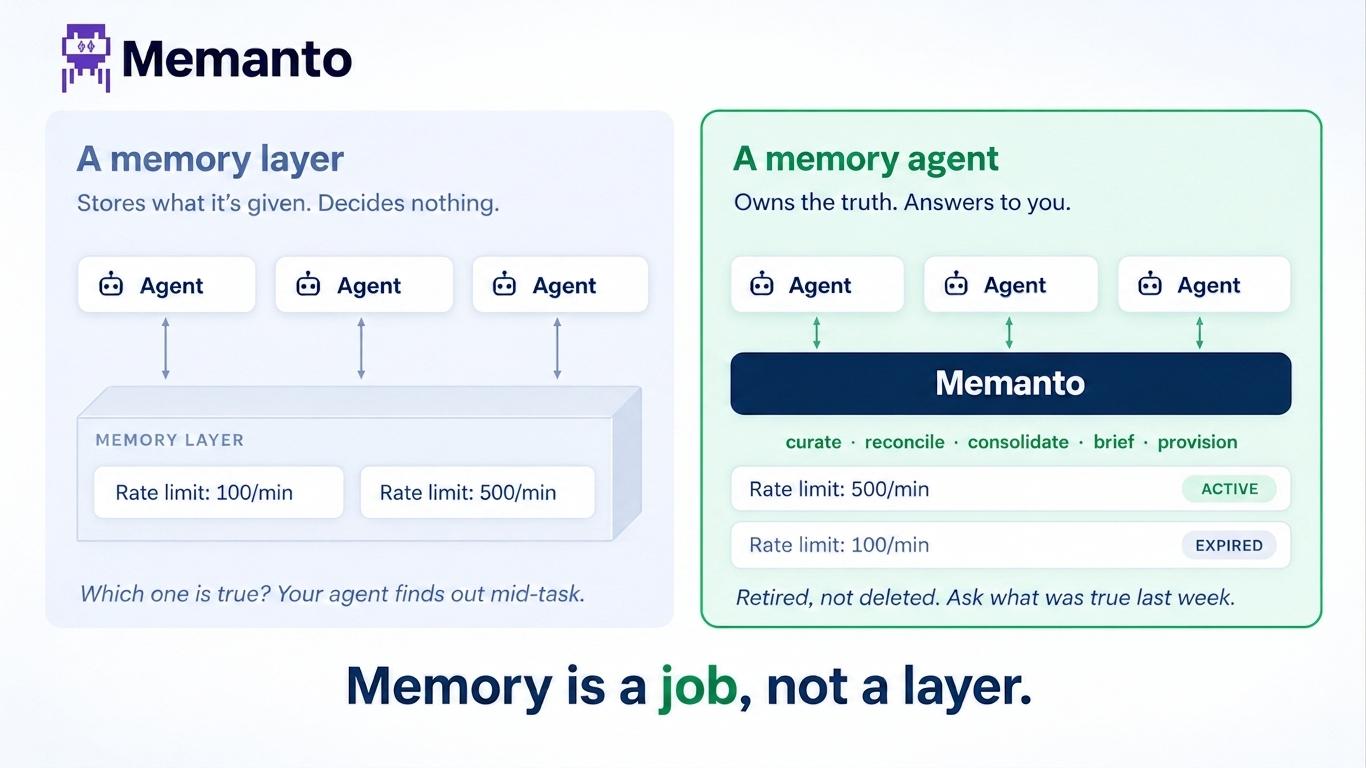
Memanto's expiry is a durable state change. A sweep stamps status, expired_at, and expired_by onto the record, so the memory can tell you the date it aged out and the name of the rule that retired it. It still comes back from recall, clearly labelled, and memanto memory restore puts it back. You write the retention table and the rules once, per agent, in a YAML file you can read.
Dampening a score is a heuristic you have to trust. A stamped state change is a fact you can audit, and the difference shows up the first time someone asks why an agent stopped acting on something.
Every belief carries where it came from
Each Memanto memory stores a confidence score and one of six provenance values: explicit_statement, inferred, observed, corrected, validated, imported. That is why your migrated rows land as imported at 0.8, and why a policy rule can say "retire inferred guesses below 0.5 confidence after fourteen days" while leaving anything a user stated directly untouched forever.
It is also what makes an estate auditable. When an agent acts on something, you can walk back to how that belief entered the fleet and how strongly it was held, which is the difference between a memory system you can operate and one you can only query.
The estate is a file you own
Memory Export is a Platform feature in Mem0. In Memanto, memanto memory export --okf produces an Open Knowledge Format bundle on any backend: plain Markdown, readable, diffable, greppable, and committable to git. It is not an escape hatch bolted on for compliance reviews. It is the working format.
That cuts both ways on purpose. memanto migrate okf imports the same bundle, and the format is open for any vendor to implement, including the ones we compete with. A migration you can reverse is the only kind worth trusting, and the point of running this one is that you keep the option.
What to do in the first week after
Migrating gets your memories into a typed estate. The reason to have a typed estate is what you can do next, and none of it was possible while the memories were strings with labels.
bash# 1. Nothing imported is validated. Give guesses a shorter life than facts.
memanto policy list-preset
memanto policy apply-preset balanced
memanto policy apply --dry-run          # exactly what would expire, per rule

# 2. A thousand memories from four scopes will contradict each other.
memanto conflicts

# 3. Read the estate back through time, using Mem0's own timestamps.
memanto recall "escalation policy" --as-of 2026-03-01
memanto recall "escalation policy" --changed-since "last 30 days"

# 4. Let it curate itself nightly.
memanto schedule enable
Run memanto conflicts on day one specifically. A migration is the single most likely moment for your estate to contain two incompatible beliefs, because you have just merged four entity scopes that were never reconciled against each other inside Mem0. The conflict pass surfaces them with both versions side by side and a recommended resolution, and the decision stays yours.
Command reference
| Flag | Effect |
|---|---|
--dry-run | Map and report with no writes. Needs no active agent. |
--api-key | Mem0 key, saved to ~/.memanto/.env. Also reads MEM0_API_KEY. |
--file, -f | Use an export JSON on disk instead of calling Mem0. |
--agent, -a | Target agent id. Defaults to the active agent. |
--report | Write the savings report on a real run as well. |
The same flags and the same pipeline work for the other providers: memanto migrate letta, memanto migrate supermemory, and memanto migrate okf for a portable Open Knowledge Format bundle from anywhere. The OKF path is the only one that carries expiry and TTL through natively, which is what an open interchange format is for.
Start with the dry run. It costs one command and tells you more about your own Mem0 account than the Mem0 dashboard will.