Building Multi-Agent Systems on Snapdragon X Series CPUs: Persistent On-Device Memory with Memanto and Qualcomm GenieX
A team of agents on a Snapdragon X PC needs one shared memory that never leaves the device. Pair Qualcomm GenieX for on-NPU inference with open-source Memanto on a local Moorcheh server, and every agent gets typed, time-aware recall in a fraction of the RAM a float32 index needs.
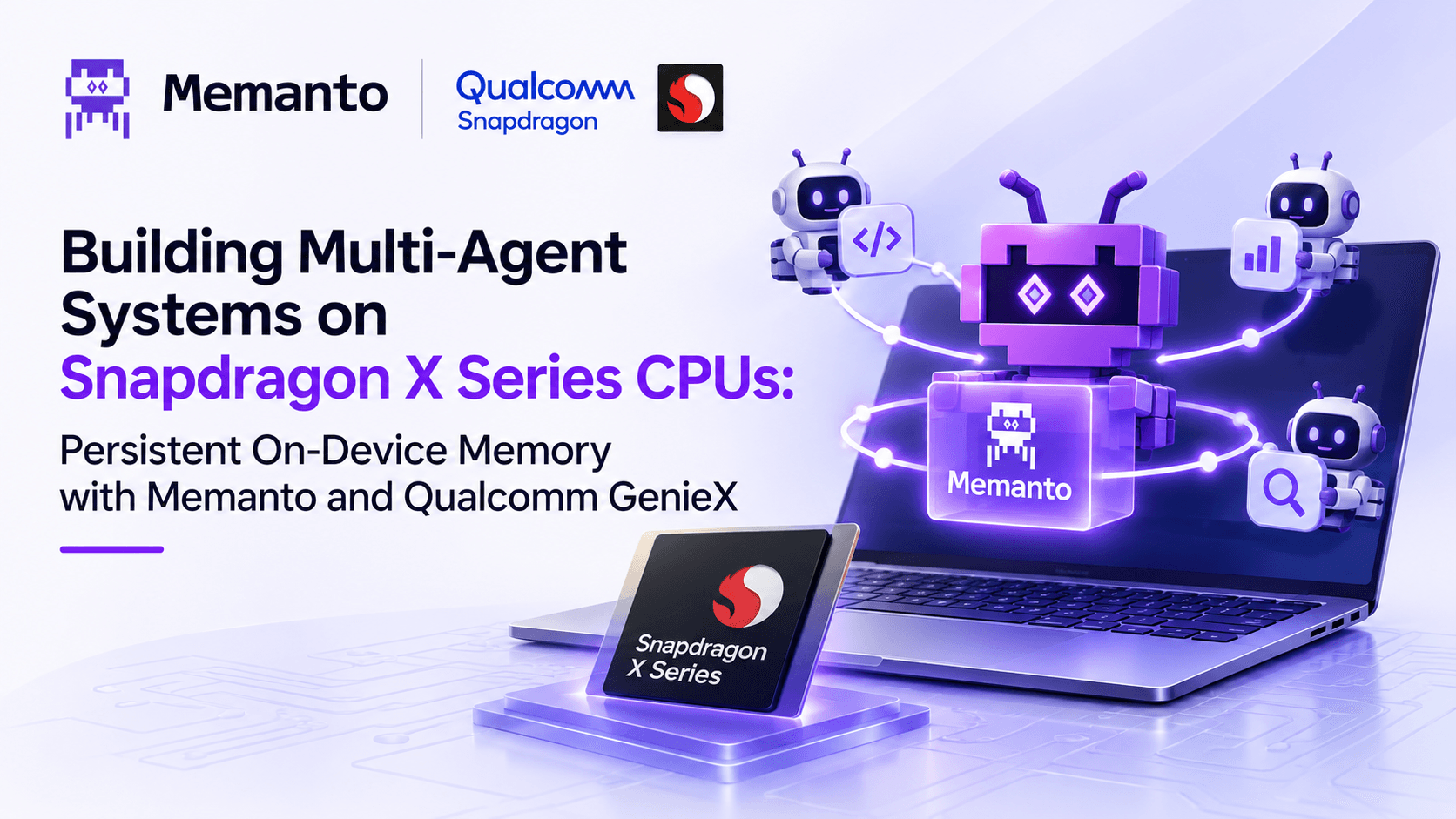
Windows on Snapdragon® PCs pair the Qualcomm® Oryon™ CPU with a dedicated Qualcomm® Hexagon™ NPU, rated at 45 TOPS on Snapdragon® X Elite and X Plus and up to 80 TOPS on Snapdragon® X2 Elite. With Qualcomm GenieX, an on-device generative AI runtime for Snapdragon, developers can run quantized small language models such as Qwen3-4B on the NPU, entirely on the PC and at low power.
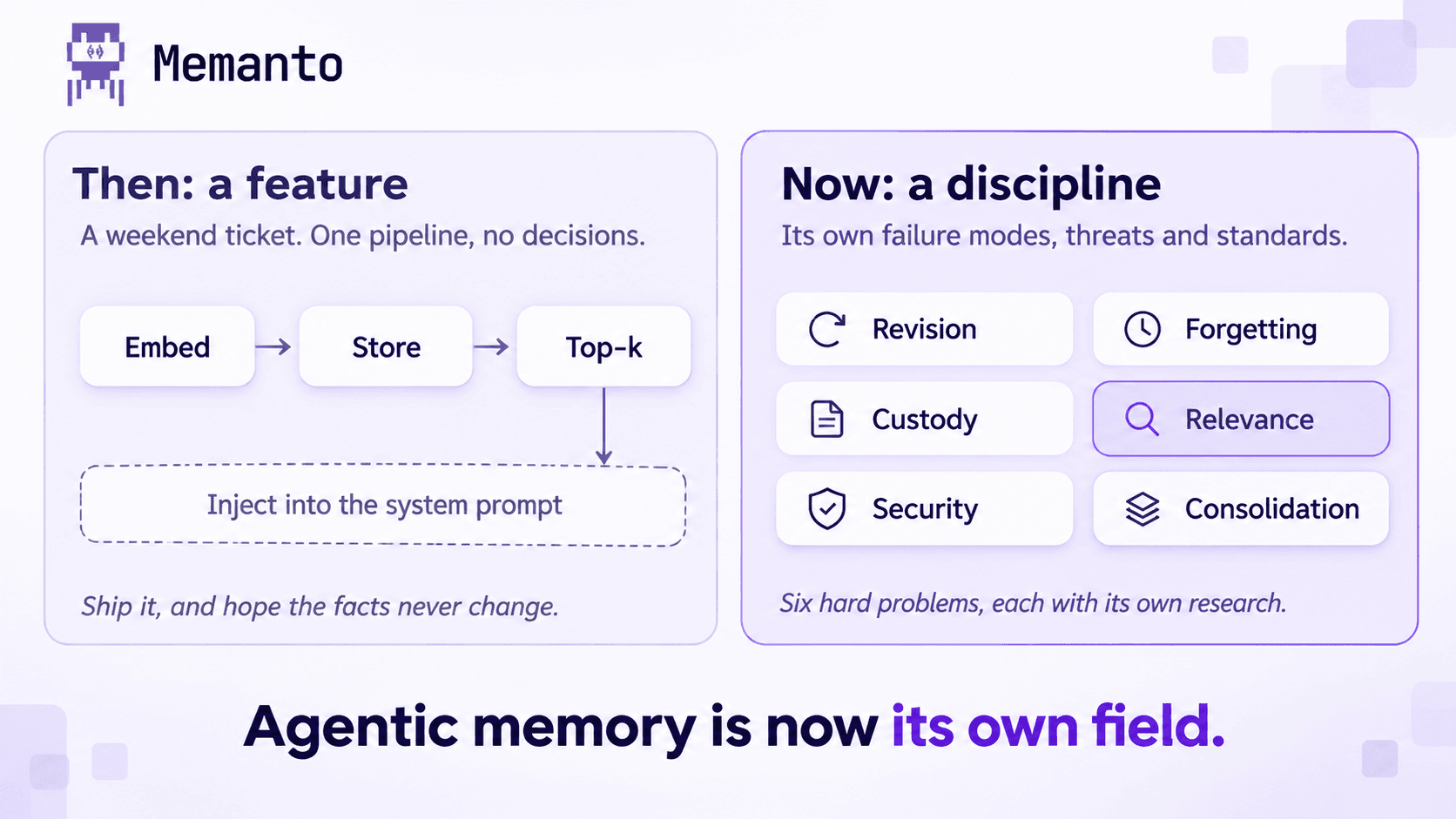
On-device AI isn't just about running the model locally. The memory and orchestration layers also need to be designed for the edge.
As applications move from single-prompt chatbots to multi-agent systems, such as a corporate travel and booking concierge, developers hit a different bottleneck: agent memory.
When several agents (for example a Booking Agent, a Budget & Compliance Agent and a Calendar Agent) collaborate on a workflow that spans days, stuffing the context window stops working. Passing full conversation histories and past travel records into every prompt overflows the context window, slows generation and wastes the device's memory. Sending that history to a cloud-hosted vector database instead moves personal schedules and travel records off the PC.
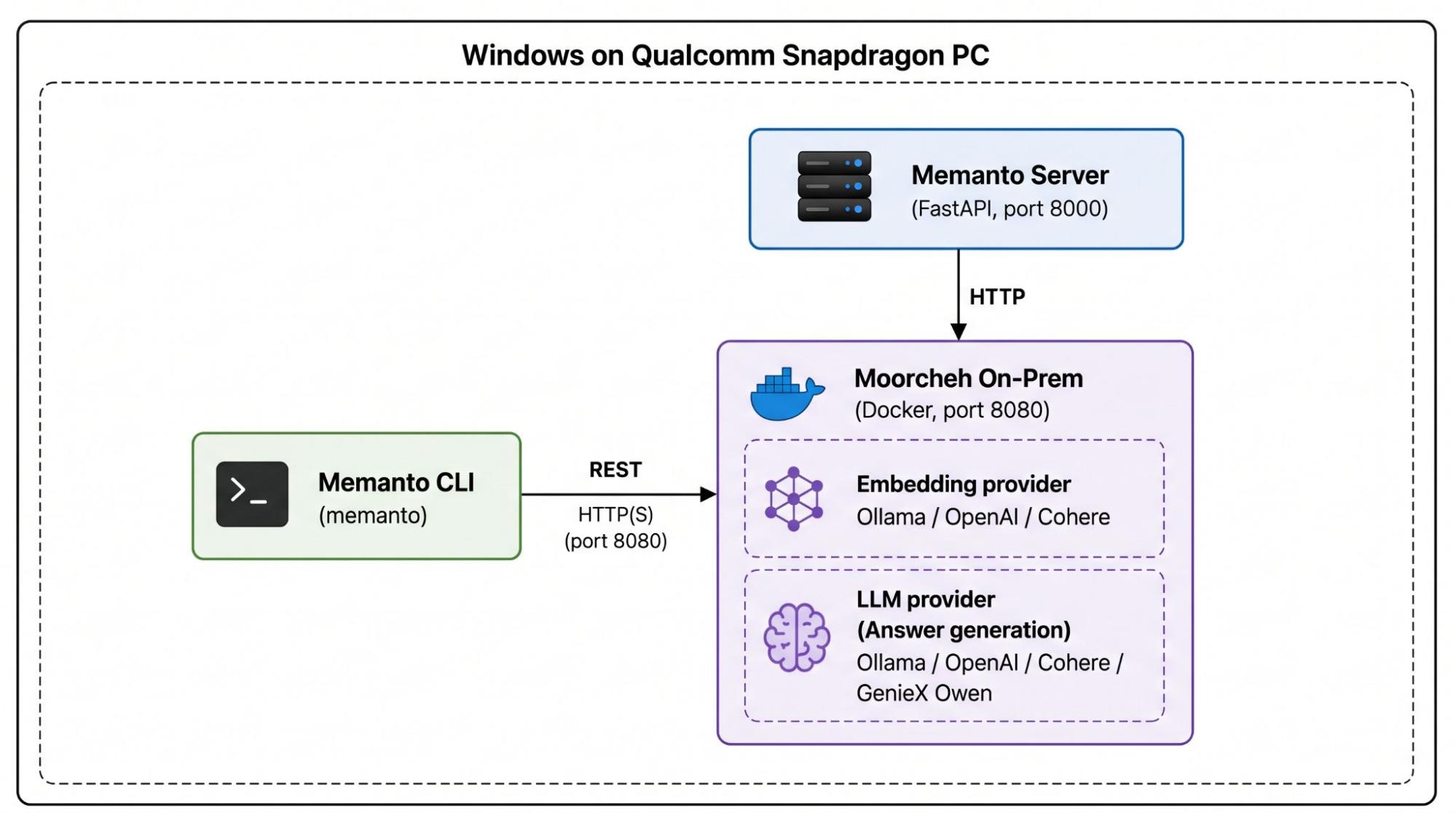
Pairing Qualcomm GenieX for on-NPU inference with Memanto, an open-source, typed memory agent that runs fully on-prem on the Moorcheh information-theoretic retrieval engine, gives a team of agents one shared, persistent memory that never leaves the device.
The Challenge: Multi-Agent Travel Planning at the Edge
Consider an AI travel assistant running locally on a Snapdragon X PC. It receives this request:
“"Book the same outbound flight to Chicago I took last November, find a hotel within walking distance of the venue that honors my corporate rate, and adjust my Friday schedule to avoid landing during rush hour."
Fulfilling it takes several specialized agents:
- User Profile & Preference Agent: recalls frequent-flyer details, seat preferences (aisle, extra legroom) and past itineraries.
- Flight Search & Ticketing Agent: queries airline APIs or a local schedule cache and checks availability.
- Policy & Budget Agent: validates the itinerary against corporate travel allowances, per-diem rates and hotel rate caps.
- Calendar & Scheduling Agent: detects meeting conflicts, adds travel buffers and updates calendar entries.
Each agent needs a different slice of the same history, and whatever one agent decides, the others must be able to see.
Memory pressure is the real constraint on a PC that must also hold the language model, the embedding model and everything else the user is running. A conventional float32 vector index stores every dimension as a 32-bit float and builds a graph on top of it. In Moorcheh's published benchmark on a Qualcomm Dragonwing–based VENTUNO Q board, an HNSW index over 1 million 1536-dimension vectors took 13.2 GiB on disk and 7.4 GB of process RAM, plus about three hours of graph build.
The Solution: One Shared, Typed Memory for Every Agent
This architecture separates reasoning from memory:
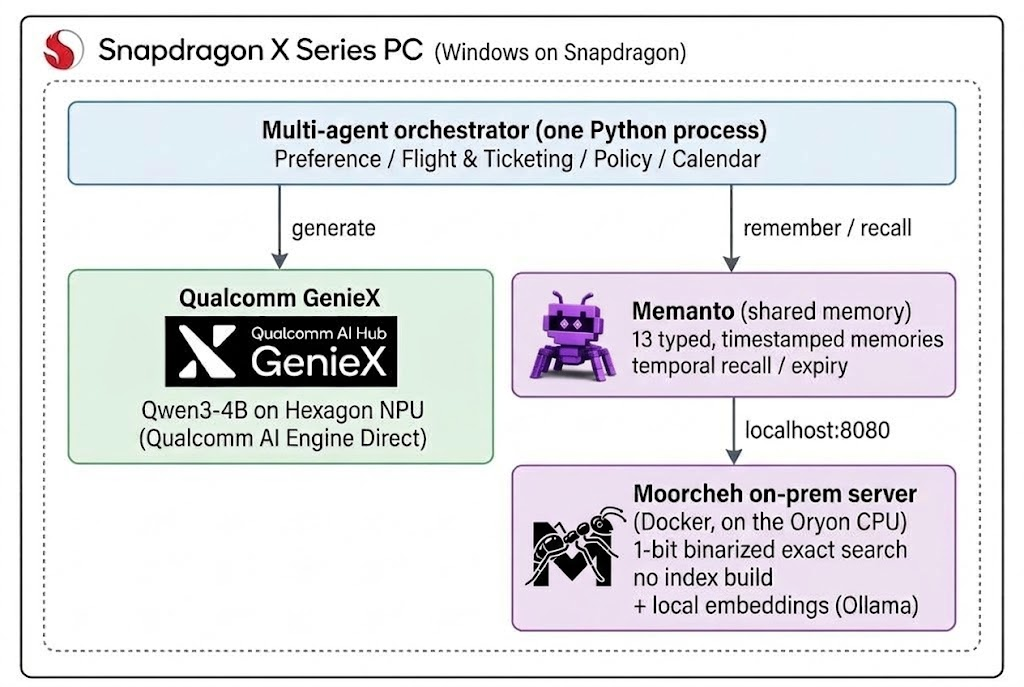
- Inference on the NPU with GenieX. GenieX runs pre-compiled Qualcomm AI Hub bundles on the Hexagon NPU through Qualcomm AI Engine Direct, or GGUF models through llama.cpp on the NPU, GPU or CPU. Generation stays on the NPU while the agents' tools and memory run on the CPU.
- Compact retrieval with Moorcheh. Memanto's on-prem backend is a local Moorcheh server running in Docker. Moorcheh binarizes each embedding to 1 bit per dimension (a 1536-dimension vector becomes 192 bytes) and runs an exact, exhaustive bitwise search, so there is no approximate index to build and a new memory is searchable within a second. In the same VENTUNO Q benchmark, Moorcheh held 100,000 vectors in a 29.3 MiB store using 173 MB of process RAM, with a 6.45 ms median search (including rerank); at 1 million vectors it used 737 MB of RAM.
- Typed, time-aware memories. Every Memanto memory has one of 13 types (preference, fact, instruction, event, commitment and others) and a timestamp. Each agent recalls only the types it needs, and temporal queries answer questions such as "what did we know as of last November?" or "what changed since Monday?"
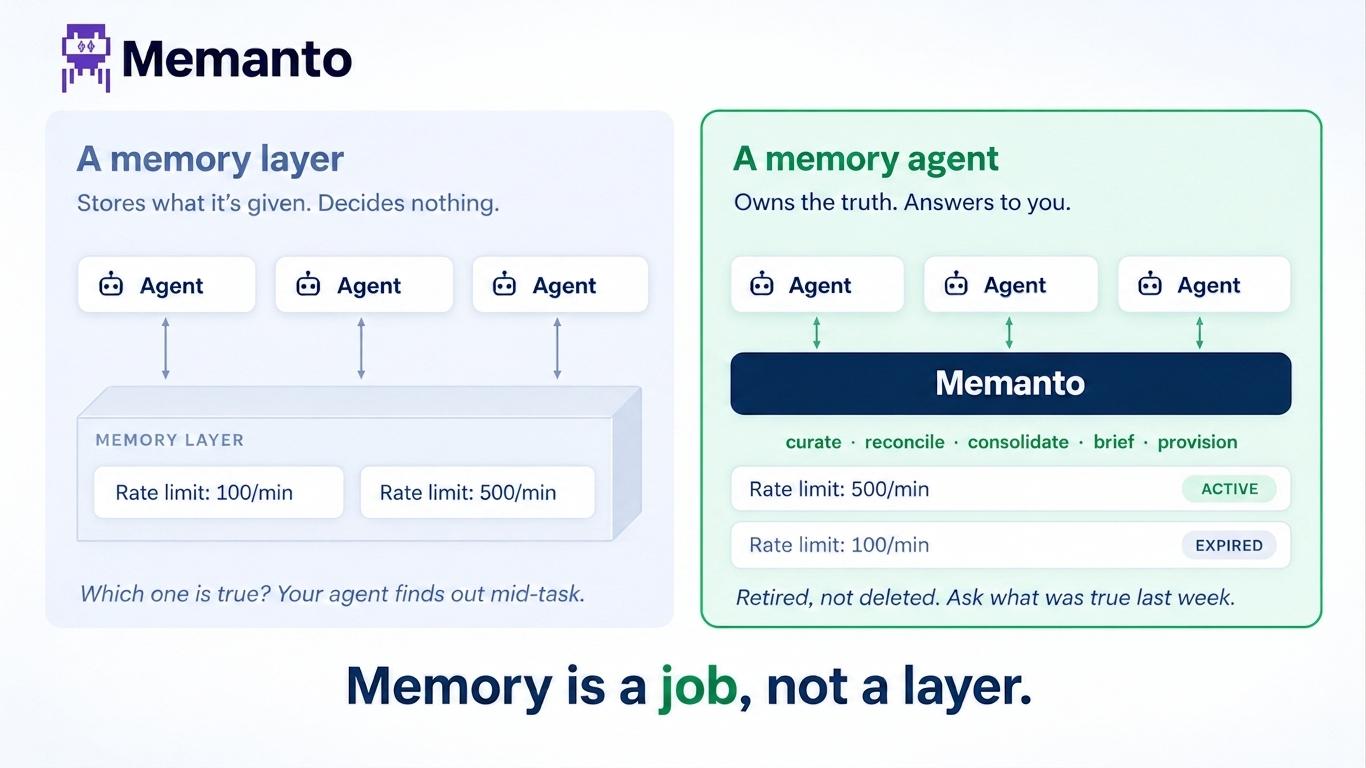
- Stale facts are retired, not silently stacked. When the user says "I no longer fly Airline X", the new preference is stored alongside the old one. Memanto's conflict detection uses the configured LLM (local, with Ollama) to flag the contradiction, and resolving it with
expire_oldretires the outdated preference: it stays in the history, labelled as expired, and the change is reversible. Per-type expiry policies (for example, retire context memories after 7 days) do the same for short-lived memories when a policy sweep runs. Agents read only active memories, so a stale preference never reaches the prompt.
Watch: Memanto On-Prem Setup
To see how Memanto runs persistent agent memory entirely on local compute, with no cloud API key, watch the setup walkthrough: Memanto On-Prem Setup Guide.
Implementation: Multi-Agent Travel Concierge on Snapdragon X
1. Install and choose the on-prem backend
Memanto's on-prem backend needs Python 3.10+ and Docker Desktop, which supports Windows on Arm. The setup wizard starts the local Moorcheh server and, if you choose Ollama, pulls a local embedding model, so no data or API key leaves the PC.
bashpip install memanto geniex
memanto        # choose "2  Moorcheh On-Prem", then Ollama for embeddings
The GenieX CLI can list the Qualcomm AI Hub bundles available for your chipset (geniex model list); the example below uses Qwen3-4B.
2. Seed the shared memory
Memories are plain text with a type and tags. Memanto stores them in the local Moorcheh server, which creates the embeddings itself, so the application never handles vectors.
pythonfrom memanto import Memanto

memory = Memanto(agent_id="travel_concierge")

memory.batch_remember([
    {"content": "Prefers an aisle seat with extra legroom.",
     "type": "preference", "tags": ["traveller"]},
    {"content": "Last November flew the 7:05 AM nonstop from Newark to Chicago O'Hare.",
     "type": "event", "tags": ["flight_history"]},
    {"content": "Chicago hotels must not exceed the $250 per night corporate rate.",
     "type": "instruction", "tags": ["travel_policy"]},
])
3. Run the agents
Every sub-agent shares one Memanto agent and reads only the memory types it needs. GenieX generates the responses on the NPU.
pythonfrom geniex import AutoModelForCausalLM
from memanto import Memanto

# 1. Language model on the Hexagon NPU: a pre-compiled Qualcomm AI Hub bundle,
#    run by GenieX through Qualcomm AI Engine Direct.
llm = AutoModelForCausalLM.from_pretrained("ai-hub-models/Qwen3-4B")

# 2. One Memanto agent = one memory pool shared by every sub-agent.
#    On the on-prem backend no API key is needed.
memory = Memanto(agent_id="travel_concierge")


def generate(system: str, user: str, max_new_tokens: int = 512) -> str:
    messages = [
        {"role": "system", "content": system},
        {"role": "user", "content": user},
    ]
    prompt = llm.tokenizer.apply_chat_template(messages, add_generation_prompt=True)
    return "".join(llm.generate(prompt, max_new_tokens=max_new_tokens, stream=True))


class Agent:
    def __init__(self, memory_types: list[str]):
        # The slice of the shared memory this agent reads.
        self.memory_types = memory_types

    def briefing(self, query: str, limit: int = 5) -> str:
        result = memory.recall(query, type=self.memory_types, limit=limit)
        # Recall labels retired memories as expired; keep only current ones.
        active = [m for m in result["memories"] if m["status"] == "active"]
        return "\n".join(f"- [{m['type']}] {m['content']}" for m in active)


class TravelPlanner(Agent):
    def plan(self, request: str) -> str:
        history = self.briefing(request)
        return generate(
            "You are a travel concierge. Follow the traveller's history and preferences.",
            f"Traveller memory:\n{history}\n\nRequest: {request}",
        )


class ComplianceAgent(Agent):
    def review(self, itinerary: str) -> str:
        policy = self.briefing("corporate travel policy, hotel rate caps, per diem")
        return generate(
            "Check the itinerary against corporate travel policy. "
            "Reply APPROVE or DENY with one sentence of reasoning.",
            f"Policy:\n{policy}\n\nProposed itinerary:\n{itinerary}",
        )


def main() -> None:
    request = "Book the flight to Chicago I took last November, for the Nov 12 tech expo."

    planner = TravelPlanner(["preference", "event"])
    auditor = ComplianceAgent(["instruction"])

    # Agents share one Memanto instance, so they take turns (an instance is not thread-safe).
    itinerary = planner.plan(request)
    decision = auditor.review(itinerary)

    # Write the outcome back so the calendar agent, and the next session, can recall it.
    memory.remember(
        f"Chicago trip for the Nov 12 tech expo. Itinerary: {itinerary} Compliance: {decision}",
        type="commitment",
        tags=["active_reservation"],
    )
    llm.close()


if __name__ == "__main__":
    main()
Because the outcome is written back as a typed commitment memory, the Calendar Agent, or the same concierge next week, can recall the active reservation without replaying the conversation.
Architectural Trade-offs: Cloud RAG vs. Local Float32 Index vs. Memanto
| Cloud-hosted vector RAG | Local float32 index (HNSW) | Memanto on-prem | |
|---|---|---|---|
| Where data lives | With the cloud provider | On the device | On the device, in a local Docker container |
| Network at run time | Every recall is a round trip | None | None, once models are pulled (with local embeddings) |
| Index build | Managed by the provider | ~198 s at 100k vectors; ~3 h at 1M† | None; new memories searchable within a second |
| Retrieval storage, 100k vectors | Provider-side | 1.3 GiB† | 29.3 MiB† |
| Retrieval RAM, 1M vectors | Provider-side | 7.4 GB† | 737 MB† |
| What agents get back | Text chunks | Text chunks | Typed, timestamped memories with active/expired status; temporal queries |
† Moorcheh, What Retrieval Costs on the Board: Ventuno Q Benchmarks: Moorcheh Edge (in-process) vs. HNSW (float32, cosine) on random 1536-dimension vectors. Median search at 100k vectors was 6.45 ms for Moorcheh including rerank and 4.22 ms for HNSW graph search without a reranker. Memanto's on-prem stack also runs its own server, a Docker VM and an embedding model, which add to these figures.
Unlocking Local Multi-Agent Ecosystems
Keeping the retrieval layer small leaves more of the PC's memory for the models themselves. Developers can add agents that track expenses, manage calendars, book reservations or follow technical projects, all reading from and writing to one private, typed memory that stays on the Snapdragon X PC.
Snapdragon X can become a platform for private, persistent, multi-agent AI, where inference, memory, and orchestration can all happen locally. That shifts the narrative from “Snapdragon runs LLMs” to “Snapdragon enables complete agentic AI applications.”
References & further reading
Moorcheh & Memanto
- arXiv: Memanto: Typed Semantic Memory with Information-Theoretic Retrieval for Long-Horizon Agents
- Memanto on GitHub (open-source)
- Memanto On-Prem documentation
- Memanto Python SDK
- Memanto memory lifecycle: expiry and conflict resolution
- Video: Memanto On-Prem Setup Guide